 By Admin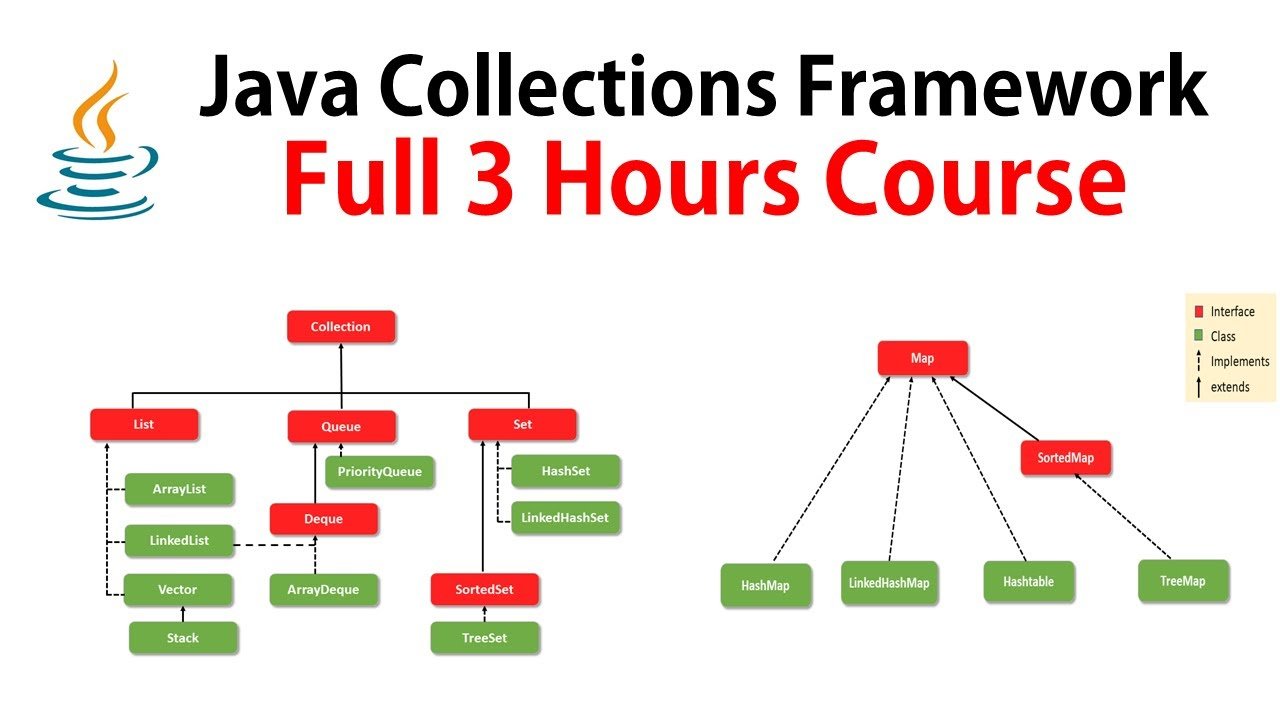
Introduction
The collection framework in Java is a group of classes and interfaces. It helps you store and manage groups of objects in a simple way. You can use lists, sets, maps, and queues to model data. I will answer what is collection framework in java clearly and slowly. We will cover key interfaces, common implementations, and tips for use. You will see short examples you can run in a small IDE. The goal is to build your confidence. Little experiments help a lot. Try things and watch how methods behave in practice.
Why Collections Matter.
Collections make code readable and shorter. They replace low-level loops with well tested methods. When you use collections, you use shared ideas and designs. This makes teamwork and maintenance easier in the long run. You can rely on proven code instead of building from scratch. Collections give helpers for sorting, searching, and transforming data. They also make code less error prone. For many tasks, collections cut dozens of lines into a few method calls. That saves time and reduces bugs in real projects and small tasks alike.
Core Concepts: Interface and Implementation.
Java separates the what from the how with interfaces and classes. Interfaces like List and Set describe behavior you can count on. Implementations like ArrayList and HashSet decide the details of storage. This lets you write flexible code that is easy to change. You write against an interface and swap implementations later. Generics add type safety so mistakes show up at compile time. Iterators let you walk collections safely. The design keeps code modular and testable. That is the heart of what is collection framework in java.
Key Interfaces You Should Know.
The main interfaces are Collection, List, Set, Queue, and Map. Collection is the root for many types of groups in Java. List keeps order and allows duplicates while Set forbids duplicates. Queue models tasks that wait to be handled in order or by priority. Map stores key-value pairs for fast lookups and joins. There are sub-interfaces like Deque, NavigableSet, and SortedMap for special needs. Learning these interfaces helps you pick the right tool for each job. They are the vocabulary of collection-based design.
List Implementations: ArrayList and LinkedList.
ArrayList uses a dynamic array under the hood for storage and grows when needed. It gives fast random access by index and low memory overhead relative to linked lists. LinkedList uses nodes linked by references for each element and can add or remove items near ends quickly. Choose ArrayList for most use cases with many reads and random access. Choose LinkedList when you need many insertions or deletions at the ends. Both implement List and share common methods. Try both in small tests to see real differences in speed and memory use.
Sets: HashSet, LinkedHashSet, TreeSet.
A Set prevents duplicates and is handy for membership checks or filters. HashSet uses hashing for fast add and contains operations in average time. LinkedHashSet preserves insertion order when you iterate elements. TreeSet keeps elements sorted and supports range views and queries with ordered methods. Each set type has tradeoffs in speed, memory, and ordering behavior. Use HashSet for fastest membership checks. Use LinkedHashSet when order matters. Use TreeSet when you need sorted data or range methods. Sets help enforce unique data naturally and simply.
Maps: HashMap, LinkedHashMap, TreeMap.
Map stores pairs of keys and values for fast lookup by key. HashMap is the usual choice for general use and offers good average performance. LinkedHashMap adds predictable iteration order when you need to show results in insertion order. TreeMap keeps keys in sorted order for range operations and ordered views. Maps are great for caches, lookup tables, and joining data by key. You can tune initial capacity to avoid rehash cost. Maps pair well with generics to hold safe types and clear code contracts.
Iteration and Traversal.
Iterator provides a safe way to loop through collection elements with hasNext and next. You can call remove on an iterator to delete the current element safely. The for-each loop is short and readable for most needs. ListIterator supports bidirectional moves and index-based operations in lists. Streams offer a concise, modern way to filter, map, and reduce collections in a functional style. For concurrent modification, use iterators that are fail-fast or choose concurrent collections. Learning traversal options improves both clarity and safety in code.
Generics and Type Safety.
Generics let collections hold specific types with compile-time checks. Use List<String> to ensure the list holds only strings. Generics reduce ClassCastException at runtime and make code clearer. Wildcards like ? extends and ? super add safe flexibility for reading and writing. Generic methods let you reuse logic across types without losing type safety. The collection framework in Java is built to work well with generics and strong typing. Use generics as a habit to improve readability and reduce bugs.
Utility Methods in Collections Class.
The Collections class contains many useful static utility methods you will call often. You can sort, shuffle, and search lists with a single call. There are wrappers to make collections unmodifiable or synchronized. Use Collections.binarySearch on a sorted list for fast searches. Utilities like frequency and rotate save you from writing common code. The Collections class complements the framework by offering proven algorithms and safe wrappers. These helpers speed development and reduce simple bugs in day-to-day coding.
Performance Basics and Big-O.
Every collection has typical time costs for main operations that you should know. Array access by index is O(1) and very fast. Linked structures give O(1) insertion at ends but O(n) access by index. Hash-based maps and sets usually give O(1) average time for lookup. Tree-based structures give O(log n) for search and insert. Choosing the right collection reduces runtime cost. Also consider memory footprint and cache friendliness when working with large data. Small tests reveal real effects for your dataset sizes.
Concurrent Collections and Thread Safety.
Concurrent collections help when many threads share data and avoid heavy locks. ConcurrentHashMap and CopyOnWriteArrayList are designed for multi-threaded use. Synchronized wrappers provide basic thread safety but can limit scalability. Blocking queues like LinkedBlockingQueue work well for producer-consumer patterns. Choose concurrent classes to reduce lock contention and to scale across threads. Design for concurrency early to avoid subtle bugs. Understand iteration behavior under modification to pick the right tool for shared access.
Arrays Versus Collections.
Arrays are good for fixed-size and low-level performance needs. Collections give flexibility and many utility methods to use freely. Pick arrays when memory and raw speed matter and size is fixed. Pick collections when you need dynamic size, rich APIs, or convenience. Collections add some overhead but save development time and reduce bugs. In modern Java, collections are the usual choice for data tasks. Arrays still shine in tight loops and native interop, so use both when appropriate based on tradeoffs.
Real Examples You Can Try.
Try List<String> names = new ArrayList<>(); to add names easily. Add names with names.add("Aisha"); names.add("Bilal"); to see list growth. Try Map<String,Integer> counts = new HashMap<>(); for counting frequencies. Use Set<String> unique = new HashSet<>(names); to remove duplicates fast. Change implementations to see different performance. Run these examples in a small IDE to watch behavior. Small experiments help you learn how methods behave and reveal surprises. Hands-on testing builds intuition about costs and behaviors.
Best Practices and Common Mistakes.
Program to interfaces like List and Set rather than concrete classes. Avoid raw types and prefer generics for type safety and clarity. Pre-size large collections to reduce resizing work and GC pressure. Implement equals and hashCode correctly when using hash-based types as keys. Do not rely on iteration order unless the implementation documents it. Write unit tests to check collection behavior for edge cases. These habits lead to cleaner, faster, and more maintainable code in real projects.
Migrating and Refactoring with Collections.
Switching one implementation for another is easy when you code to interfaces. Replace an ArrayList with a LinkedList in one line in most cases. Measure critical paths after migration to confirm performance remains acceptable. Use adapters for custom behavior without wide rewrites. Keep method contracts stable while refactoring to avoid surprises in callers. The collection framework in Java supports gradual changes and encourages cleaner design. Small experiments and tests make migration safe and predictable.
Personal Insights and Practical Tips.
I use collections daily in projects and in teaching sessions. Students often improve quickly when they learn a few common methods. In one task, switching to a set removed duplicates and fixed a production bug fast. In another project, LinkedHashMap preserved insertion order for reporting and made tests stable. Try small, reversible changes to collections in your code. Measure and compare before and after. These small wins build intuition and trust for future design choices. Practical tests are worth the time.
LSI Keywords and Related Terms.
Related terms help search engines and readers find this topic and its examples. Common LSI keywords include Java Collection Framework, collections API, and List interface. Other useful terms are Set interface, Map interface, ArrayList, LinkedList, and HashMap. You will also see TreeMap, TreeSet, iterator, Iterable, and Collections utility in docs and books. Concurrency terms include ConcurrentHashMap and CopyOnWriteArrayList for thread safe work. Generics, Comparator, Comparable, equals, and hashCode are often tied to collection behavior and interviews.
Troubleshooting Common Issues.
When collections behave oddly, inspect elements and order with logging or a debugger. Check equals and hashCode for unexpected duplicates in sets and maps. For sorted collections, ensure objects implement Comparable or provide a Comparator. Watch for ConcurrentModificationException and use safe iterators or copy-on-write strategies when needed. Convert a collection to a list and print elements to reveal hidden surprises. These small checks often solve most collection bugs quickly and without long debugging sessions.
Conclusion and Next Steps.
Now you know what is collection framework in java and why it matters. Practice with small tasks and try different implementations for insight. Read API docs and test methods in the Collections utility class. Favor interfaces and use generics for safety and clear code contracts. Keep exploring and you will gain speed and confidence with collections. If you want, ask me for tailored examples or a short cheat sheet. Try a small project that uses lists, sets, and maps to lock in these ideas.
FAQ: What is collection framework in Java and why use it?
The question what is collection framework in java asks what tools Java gives for groups of objects. The answer is that it is a set of interfaces and classes to store and manage collections. You use it to avoid manual array code and to gain tested methods, utilities, and common patterns. Collections improve reliability and speed development by using shared, well tested code. Practical uses include user lists, ID sets, and maps for fast lookups. Learning the basics helps you write clearer code and reduce bugs in everyday work and interviews.
FAQ: How do I choose between ArrayList and LinkedList?
Choose ArrayList when you need fast random access and low memory overhead. Choose LinkedList when you have many insertions or deletions at list ends. Consider how often you read by index and how often you insert or delete. Test with realistic data to see real behavior for your case. Declare variables as List to keep your code flexible and easier to refactor. Small benchmarks and simple tests help you learn how cache effects and node overhead change performance.
FAQ: How many core interfaces are in the framework?
The main interfaces include Collection, List, Set, Queue, and Map. There are also sub-interfaces like Deque, NavigableSet, and SortedMap for specific needs. Each interface serves a role around order and duplicate rules. Learn them step by step and try short code examples to see use cases. Knowing these interfaces helps you read and write Java code with clarity and purpose. They form the backbone of most Java data handling.
FAQ: Are collections thread safe by default?
Most standard implementations are not thread safe by default to remain fast. Use concurrent collections like ConcurrentHashMap for safe multi-threaded access without heavy locks. Synchronized wrappers provide a basic safety layer but may limit scalability. Design for concurrency early and pick the right structure for shared data. Understand that iteration may not be stable during writes and choose atomic operations or locks if needed. Correct class choice avoids many common concurrency bugs.
FAQ: What does the Collections utility class do?
Collections is a helper class with static methods for everyday tasks. You can sort or shuffle lists and create unmodifiable views of collections. It contains algorithms like binarySearch and helpers like frequency and rotate. Use Collections to avoid writing boilerplate code. It pairs well with the collection interfaces and implementations and speeds development. The utility methods save time and reduce simple algorithm mistakes.
FAQ: What are common mistakes new developers make with collections?
New developers often use raw types without generics and lose type safety. They may forget to implement equals and hashCode for keys in maps or elements in sets. Another common error is trusting iteration order without checking documentation for the chosen implementation. Pre-sizing large collections is often ignored and causes extra resizing cost. Read docs, write small tests, and run examples with realistic data sizes to avoid these pitfalls and improve code quality.